


Introduction
Since you are here, it is perhaps safe to assume that you have considered developing an app for your business. However, before you can begin development, you must resolve a dilemma that many founders or first-time builders face: “Should you start with iOS app development or Android app development?”
The decision is not just about technical preference. It influences your development budget, long-term scalability, customer acquisition strategy, and the way investors perceive your product. Building on the wrong platform not only burns resources but also slows your growth. On the contrary, choosing the right platform can accelerate adoption and revenue.
Don’t worry if you have yet to figure out the right platform. In this guide, we will find the differences between the Android and iOS app development platforms by considering factors like revenue potential, market size, market share, global reach, monetization model, development costs, and more. Further, we will present real-life case examples and data points that will help you choose the right platform that aligns best with your goals.
Why is the Platform Choice Important
Many businesses underestimate the impact of platform choice. However, you shouldn’t be under this delusion because mobile apps are not just digital products; they are your growth engines. The platform you choose largely determines how quickly you can validate your idea, how much you spend on development, how soon you reach users, and how fast you generate ROI.
Moreover, businesses must spend a significant amount of resources on building, launching, and maintaining an app. Therefore, for businesses, especially startups struggling with limited resources, it becomes essential to choose the right platform first, because it is practically impossible to dedicate resources toward developing an app for both iOS and Android.
1. Understanding the Two Ecosystems at a High Level
The mobile app development market is dominated by Android and iOS platforms. Therefore, every app that matters appears either on the Google Play Store or the iOS App Store first, at least outside of China. And choosing between the two becomes a crucial factor for programmers and businesses looking to leave a mark in the mobile world. Here is a broad high-level overview of Android and iOS app development.
1.1 What Is Android App Development?
Overview
Android app development focuses on creating apps for Google’s Android OS. Developers use Java, Kotlin, and other cross-platform applications for building Android applications. The apps run on a wide range of device ecosystems including smartphones, TVs, IoT devices, smartwatches, and more. This makes the Android device ecosystem a diverse market.
Android development tooling uses Android Jetpack libraries for modern app design and architecture. The Android Debug Bridge (ADB) is used for device debugging and communication, while Gradle is used as the build system. Together, the Android Jetpack libraries, ADB, and Gradle make up the core components of the Android SDK and development environment.
Android offers some of the best integrated development environments, like Android Studio, offering prominent features for debugging, designing, and device emulation.
Role of Google
While Android itself is open-source, Google plays a central role in shaping the Android ecosystem. Google provides critical services like Google Maps, Google Play Store, Google Analytics, Google Pay, and Firebase. Businesses can use these tools to build, monitor, distribute, and monetize Android applications efficiently.
Device manufacturers like Samsung, Xiaomi, OnePlus, and Motorola are also part of the Android ecosystem and add their own hardware features and software layers. This makes the Android ecosystem complex and full of opportunities for app developers and businesses.
Open-Source Nature and its Implication
Because of Android’s open-source nature, developers and manufacturers have greater freedom and flexibility to customize operating systems and applications. For businesses, this means greater flexibility in app design, deeper system access, and the ability to integrate hardware-specific features.
However, the open-source nature of Android also creates several challenges. Because of the wide variety of devices, versions, and screen sizes, the testing and maintenance effort for deploying Android apps increases multifold. Businesses also need to plan carefully to ensure consistent performance and security of their applications across different devices.
Industries Using Android First Strategies
Industries prioritizing scale, mass adoption, and affordability commonly adopt Android-first development. The list includes logistics, fintech, e-commerce, ride hailing, media streaming, and consumer marketplaces. Moreover, businesses targeting global audiences or users in Latin America, Africa, and Asia often choose Android as the first platform due to its wider reach and device affordability.
1.2 What Is iOS App Development?
iOS app development is all about building applications for Apple devices like the iPad and iPhone, traditionally powered by Apple’s proprietary iOS operating system. iOS stands out for its strong security controls, premium user experience, and tightly integrated ecosystem.
iOS Ecosystem Overview
Apple fully controls the iOS ecosystem, ranging from the operating system and hardware to app distribution through the Apple App Store. Through this vertical integration, Apple can deliver consistent design standards, performance, and security across all devices. For businesses, this means a more predictable development environment, a highly polished end-user experience, and fewer device variations.
Apple’s Closed Ecosystem Philosophy
Apple is known for locking down its App Store tightly and treating it like Fort Knox. It rarely hosts dangerous apps. To maintain its security, Apple releases strict guidelines relating to design, privacy, data usage, and functionality that developers must adhere to. Every app update is reviewed by Apple before it reaches users.
This strict security review process ensures higher quality within the ecosystem but, on the flip side, can slow down releases. For businesses, however, approval from Apple enhances user confidence and brand credibility.
Focus on Premium Users and Controlled Hardware
iOS users can be categorized into higher-income demographics in markets like the United States, Canada, Western Europe, and parts of the Middle East, and are more likely to pay for apps, in-app purchases, and subscriptions.
Moreover, due to Apple’s limited device lineup compared to Android, developers can optimize their apps more effectively, resulting in a smoother user experience, better performance, and greater user satisfaction.
Industries That Prefer iOS-First Launches
Industries prioritizing premium user experience, monetization, and security often prefer iOS as their first go-to platform for app launches. Industries that fall into this category include B2B SaaS platforms, finance and banking apps, healthcare applications, enterprise software, lifestyle or subscription-based consumer apps, and productivity tools.
2. Market Share & Global Reach: Where Are Your Users?
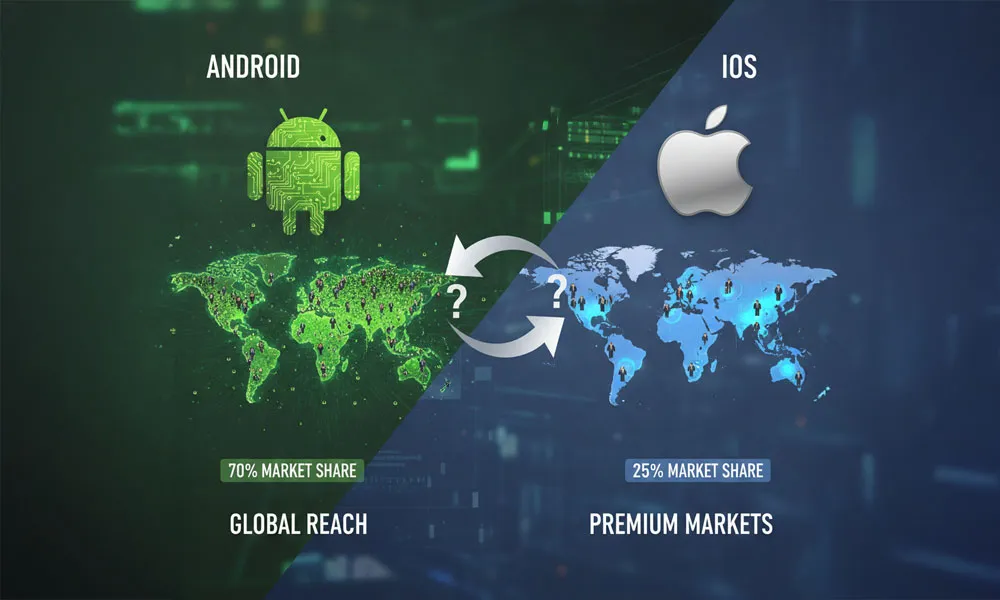
When deciding whether to build for Android or iOS first, the most practical question to start with is: where are your users?
By understanding regional and global market share, user demographics, and behavioral trends, you can clearly understand which platform is most likely to help you achieve the desired traction. It is important to consider that the choice of platform is not uniform for every industry. Economics, affordability, device penetration, and culture influence the platform that dominates a particular region. By choosing the right one, you can reduce your acquisition costs, improve user engagement, and deliver superior performance early.
2.1 Global Market Share Comparison
Worldwide Android vs iOS Usage Trends
Android dominates the smartphone market globally and accounts for 70% of the mobile operating system market. In comparison, iOS accounts for approximately 30% of the market share. Android’s global dominance is driven by:
- A wide range of devices at different price points
- Broader distribution through multiple manufacturers like Samsung, Motorola, and Xiaomi
- Strong presence in emerging and populous markets
Therefore, if you are targeting broader reach and scale in international markets, Android’s market share makes it a lucrative platform for your app. However, broader market share statistics can be misleading, and therefore, let us dive deep and understand individual users and their behavior.
2.2 Country-wise Breakdown
Android Dominance in India, Southeast Asia, and Africa
In several emerging economies, Android market share is higher than the global average. Countries that have lower income levels but high smartphone adoption rates, like India, Indonesia, Southeast Asia, and Nigeria, show Android penetration often exceeding 80%.
iOS Dominance in the US, UK, Australia, and Japan
In comparison, iOS holds a much higher share of the market in developed economies like the United States, the United Kingdom, Japan, and Australia. In the United States in particular, iOS usage stands at around 55–60%, even though Android has a significant presence.
2.3 Target Audience Behavior
Spending Habits of Android vs iOS Users
The spending habits of users vary significantly between platforms. In general, iOS users are more likely to pay for apps, in-app purchases, and subscriptions. iOS users generate higher average revenue per user (ARPU) in several categories like productivity, premium games, and recurring services.
In contrast, although Android users are larger in number, they tend to pay less per user. However, you should not infer that Android users are less valuable. With this basic understanding, you can determine your monetization strategy based on the platform.
App Usage Patterns
Usage patterns also differ based on the platform. Whereas iOS users often engage more with utility, subscription-oriented, and premium apps; Android users show greater engagement with video, social, messaging, and utility apps.
User Loyalty and Upgrade Cycles
Loyalty and device upgrade behavior also play a role in platform strategy. iOS users typically upgrade their devices more frequently than Android users, which means:
- Faster adoption of new OS features
- Stronger consistency in app performance
- Lower fragmentation across OS versions
Android, due to its open ecosystem and multiple manufacturers, experiences more fragmentation. This requires additional development and testing effort to ensure consistent performance across devices and OS versions.
3. Revenue Potential & Monetization Models
3.1 Monetization in iOS App Development
Compared to Android users, iOS users are more likely to pay for apps, subscriptions, and in-app purchases. Thus, iOS users normally generate higher ARPU compared to Android users. So, a subscription-based productivity app may bring in more early revenue on the iOS platform.
3.2 Monetization in Android App Development
Android offers a far larger target audience compared to iOS. However, Android audiences tend to spend less, resulting in lower ARPU. Thus, if you are targeting Android for your app launch, then an ad-driven or freemium-based revenue model will work well.
3.3 Which Platform Is Better for Making Money First?
Startups seeking early investor interest or revenue validation often adopt an iOS-first strategy due to faster MVP development and higher monetization potential. iOS is also the first platform of choice for B2B apps looking to offer a premium user experience to business customers. This is because, for business customers, privacy, security, and user experience matter more than cost.
4. Development Cost & Budget Considerations
The choice between Android and iOS isn’t only about the product. It is a financial decision influenced by several factors like testing effort, development cost, maintenance, and more. By accurately understanding the origination of the costs, you can plan smarter and avoid surprises later.
4.1 Cost of Android App Development
Android runs on thousands of devices from multiple manufacturers, each with different screen sizes, hardware capabilities, and OS versions. This diversity increases development complexity.
From a cost perspective, this means:
- More effort is required to ensure a consistent user experience
- Additional development time for handling device-specific behavior
- Higher QA and debugging workload
While Android development itself is not inherently expensive, fragmentation increases engineering and testing effort, which directly affects cost.
You can start on Android with a one-time fee of $25. Developing a basic Android app costs around $20K-$50K and can extend to $500,000 for complex solutions. The time to develop and launch an Android app is between 2-6 months, depending on the app’s complexity. Device fragmentation can increase the timeframe and cost by 20-30%.
4.2 Cost of iOS App Development
iOS runs on a limited number of Apple devices with standardized hardware and tightly controlled software behavior. This creates a more predictable development environment.
As a result:
- UI and performance consistency are easier to achieve
- Fewer edge cases need handling
- The development effort is more focused
This predictability often leads to lower initial development risk and more accurate cost estimates.
To opt for iOS, you need to purchase a $99/ year subscription. This gives you access to beta software and advanced app capabilities. Development on iOS costs $20k to $60k for a basic app and extends up to $500,000+ depending on the project requirements. The timeline ranges from 2 to 6 months. The higher monetization ratio of iOS makes it more appealing for premium apps.
4.3 Long-Term Maintenance & Scaling Costs
Both Android and iOS release regular OS updates. Each update may require code changes, compatibility checks, and performance optimization.
iOS updates tend to be more uniform due to faster user adoption. Android updates, while improving, still require supporting multiple OS versions simultaneously, increasing long-term maintenance effort. Maintaining backward compatibility can become costly over time. Android apps often need to support older devices longer, while iOS apps can deprecate older versions sooner.
5. Development Speed & Time-to-Market
For startups and growing businesses, speed often matters more than perfection. Getting to market early allows teams to validate assumptions, collect user feedback, and iterate before competitors catch up. The choice between Android and iOS can significantly influence how fast you move from idea to launch.
5.1 MVP Development: Android vs iOS
In most MVP scenarios, iOS tends to enable faster initial launches. The limited number of devices and standardized hardware reduces development complexity. Teams can focus on core functionality instead of optimizing for dozens of device variations.
Android MVPs may take slightly longer due to:
- UI adjustments across screen sizes
- Handling different OS behaviors
- Additional testing cycles
However, if your MVP targets emerging markets or a broad consumer base, Android’s reach may justify the extra effort.
5.2 App Update & Release Cycles
App Store Review Process (iOS)
Apple follows a strict app review process. Every update goes through a manual review that checks performance, security, privacy, and compliance with App Store guidelines.
While this improves overall app quality, it can slow down releases. Reviews typically take one to three days, and rejections can delay timelines if guidelines are misunderstood.
For businesses, this means planning updates carefully and avoiding last-minute releases.
Google Play Approval Process (Android)
Google Play uses a largely automated review system. Most updates are approved within hours, allowing faster iterations and rapid bug fixes.
This flexibility supports agile development and frequent experimentation. However, less stringent reviews also mean businesses must take greater responsibility for security and quality assurance before release.
5.3 Impact on Go-To-Market Strategy
iOS favors stability and controlled growth. It is ideal for businesses prioritizing:
- Polished user experience
- Predictable releases
- Premium brand perception
Android favors speed and scale. It suits companies that want to:
- Test ideas quickly
- Iterate frequently
- Reach diverse markets early
The decision directly affects marketing timelines, launch campaigns, and user acquisition strategies.
6. Design, UI/UX & User Expectations
Design is not just about how an app looks. It shapes how users interact, how quickly they understand features, and whether they continue using the product long term. Android and iOS follow very different design philosophies, and users on each platform have distinct expectations shaped by years of ecosystem behavior.
Choosing the right platform for your first build often comes down to how design-centric your product is and how much control you want over the user experience.
6.1 UI/UX in iOS App Development
Apple’s Human Interface Guidelines
Apple’s Human Interface Guidelines (HIG) are strict and opinionated. They define how navigation, spacing, typography, gestures, and animations should behave. While this limits creative freedom to some extent, it ensures a consistent experience across all iOS apps.
For businesses, this means fewer design debates and a clearer framework to build within. Following Apple’s guidelines also reduces the risk of app rejections during review.
Consistency and Premium Feel
One of iOS’s biggest strengths is consistency. Because Apple controls both software and hardware, UI elements behave predictably across devices. This creates a polished and premium feel that users associate with trust and quality.
This consistency is especially valuable for:
- Fintech and healthcare apps
- Subscription-based products
- Enterprise tools with executive users
Users expect apps to feel refined, smooth, and intuitive on iOS.
Gesture-Based Navigation
iOS relies heavily on gestures rather than visible buttons. Swipes, long presses, and edge gestures are central to navigation. While this creates a clean interface, it requires careful onboarding to ensure users understand how to interact with the app.
Well-designed gesture flows can significantly enhance usability, but poor execution can confuse less tech-savvy users.
6.2 UI/UX in Android App Development
Material Design Principles
Android’s Material Design emphasizes clarity, responsiveness, and visual hierarchy. It uses depth, motion, and bold color systems to guide user attention. Compared to iOS, Material Design offers more flexibility in how components are styled and arranged.
This makes Android suitable for apps that need to convey a lot of information without feeling cluttered.
Customization and Flexibility
Android allows greater customization at both system and app levels. Users are accustomed to widgets, custom launchers, and personalized layouts. As a result, Android users are more forgiving of design variations and experimentation.
For product teams, this flexibility allows:
- Faster UI experimentation
- Feature-heavy layouts
- Region-specific UI adjustments
However, it also increases design and testing effort.
Device-Specific UX Considerations
Android runs on a wide range of devices with varying screen sizes, aspect ratios, and hardware capabilities. Designers must account for foldables, tablets, low-end phones, and large displays.
This diversity improves reach but adds complexity. A design that looks perfect on one device may feel awkward on another if not carefully optimized.
6.3 Which Platform Is Better for Design-First Products?
Design-Heavy Apps
For apps where design is a core differentiator, iOS often provides a better starting point. Examples include:
- Consumer social apps
- Lifestyle and wellness platforms
- Premium SaaS and fintech products
The controlled ecosystem and design consistency help create a strong first impression and brand identity.
Utility-Focused Apps
For utility-driven or operational apps, Android often has the edge. Examples include:
- Logistics and delivery apps
- Field service and manufacturing tools
- Budgeting and productivity apps
Android’s flexibility allows teams to prioritize functionality, customization, and scalability over visual perfection.
7. Technical Stack & Development Complexity
Beyond market reach and design, the technical stack you choose directly affects development speed, hiring decisions, long-term maintenance, and scalability. Android and iOS differ significantly in how applications are built, tested, and supported over time. Understanding these differences early helps avoid costly rework later.
7.1 Android Development Stack
Programming Languages: Java and Kotlin
Android app development traditionally relied on Java, but Kotlin is now the preferred language. Kotlin offers cleaner syntax, better null safety, and improved productivity while remaining fully interoperable with Java. Most modern Android applications use Kotlin as the primary language, with Java still present in legacy systems.
For engineering teams, Kotlin reduces boilerplate code and lowers the risk of runtime crashes caused by null pointer exceptions.
Android Studio
Android Studio is the official integrated development environment for Android. It provides tools for code editing, debugging, performance profiling, and UI design. Built on IntelliJ IDEA, it supports advanced features like real-time code analysis and emulators for multiple device configurations.
While powerful, Android Studio can be resource-intensive, especially when testing across many device profiles.
Compatibility Challenges
Android apps must work across multiple OS versions, device manufacturers, screen sizes, and hardware capabilities. Backward compatibility is often required, particularly when targeting emerging markets.
This increases development complexity and testing time, but it also enables wider device reach compared to iOS.
7.2 iOS Development Stack
Swift and Objective-C
Swift is Apple’s primary language for iOS development. It is fast, secure, and designed specifically for Apple platforms. Objective-C still exists in older applications but is gradually being phased out.
Swift’s strong typing and memory management reduce common programming errors, making it easier to maintain large codebases over time.
Xcode
Xcode is Apple’s official IDE for iOS development. It includes everything required to build, test, and distribute apps within the Apple ecosystem. Tools like Interface Builder, Instruments, and TestFlight are tightly integrated, offering a streamlined development experience.
However, Xcode is only available on macOS, which can limit infrastructure flexibility.
Apple SDK Ecosystem
Apple provides a highly integrated SDK ecosystem with consistent APIs across devices. Features such as Face ID, Apple Pay, HealthKit, and iCloud are deeply embedded and stable.
This tight integration simplifies development but restricts customization outside Apple’s approved frameworks.
7.3 Development Challenges Compared
Fragmentation vs Restriction
Android developers face fragmentation across devices and OS versions. iOS developers face restrictions imposed by Apple’s ecosystem. Android offers flexibility but demands more testing. iOS offers control but limits freedom.
The choice depends on whether flexibility or predictability matters more to your product.
Debugging and Testing Effort
Android requires testing across multiple devices, manufacturers, and Android versions. iOS testing is simpler due to fewer devices and consistent hardware behavior.
As a result, Android projects often require larger QA efforts, while iOS projects demand stricter adherence to platform guidelines.
8. App Store Policies, Approval & Compliance
8.1 Apple App Store Guidelines
On the Apple App Store, there are stricter quality rules that relies on a human review process. The review process takes 24 to 48 hours and keeps the app quality high on the iOS ecosystem. However, due to the involvement of humans in the review process, sometimes apps are rejected due to personal opinions. The platform’s high-value users, however, justify these more rigid rules.
8.2 Google Play Policies
Compared to the App Store, the approval process for Google Play is faster. The straightforward review process takes 2 to 3 days, and the guidelines are more flexible, allowing a wider range of apps and more ways to make money within the app. The discovery system on Google Play relies on algorithms to boost app visibility via search results and suggestions.
8.3 Risk Analysis: Which Is Safer for First-Time Apps?
Both iOS and Android are known for offering safe platforms for apps. However, if we compare the two, then iOS will rank higher due to its closed ecosystem and top-class security features.
9. Security, Privacy & Data Protection
9.1 Security in iOS App Development
Sandboxing
iOS applications operate in strict sandbox environments. Each app is isolated from others and from the core operating system. This prevents malicious apps from accessing data belonging to other applications or system processes.
Sandboxing significantly reduces the attack surface and limits lateral movement if an app is compromised.
App-Level Permissions
Apple enforces granular, user-controlled permissions. Apps must explicitly request access to sensitive resources such as location, camera, microphone, contacts, and files. Users can grant, deny, or revoke access at any time.
This transparency builds user trust and ensures applications only access what is necessary.
Strong Privacy Controls
Apple’s privacy-first philosophy includes features such as App Tracking Transparency, encrypted local storage, secure keychain services, and hardware-backed security modules.
From an enterprise standpoint, these controls make iOS a strong choice for applications that prioritize data confidentiality and compliance readiness.
9.2 Security in Android App Development
Custom Security Implementations
Android provides robust security APIs but gives developers more freedom to implement their own controls. Encryption, authentication mechanisms, and secure storage must often be designed and configured carefully by the development team.
This flexibility allows advanced customization but increases responsibility and risk if not implemented correctly.
OEM-Level Variations
Android runs on devices from multiple manufacturers, each adding its own firmware, security layers, and update schedules. While Google enforces baseline security standards, real-world protection can vary significantly by device.
Delayed OS updates on some devices may expose vulnerabilities longer than intended.
Open Ecosystem Risks
Android’s open ecosystem allows app distribution beyond Google Play. While this is beneficial in certain markets, it also increases the risk of malware, sideloaded apps, and malicious packages.
For enterprise apps, additional mobile device management and security controls are often required.
9.3 Which Platform Is Better for Sensitive Applications?
Fintech
iOS is often preferred for fintech applications due to its secure enclave, consistent OS updates, and strong user trust. Android can be equally secure, but requires stricter implementation discipline and device control.
Healthcare
Healthcare applications handling patient data benefit from iOS’s privacy enforcement and predictable hardware behavior. Android is widely used in emerging markets, but often relies on enterprise-grade security tooling to meet compliance needs.
Enterprise SaaS
Both platforms work well for enterprise SaaS. iOS offers simpler governance and lower fragmentation. Android offers flexibility, device diversity, and deeper customization when paired with proper endpoint and access management.
10. Scalability & Future Growth
Choosing a platform is not just about launching an app. It is about supporting growth, evolving features, expanding to new markets, and meeting enterprise expectations over time. Android and iOS scale differently, both technically and commercially.
10.1 Scaling an iOS App
Feature Expansion
iOS applications scale well as features become more advanced. Apple’s consistent APIs, predictable hardware performance, and tightly controlled environment make it easier to introduce new capabilities without breaking existing functionality. Feature-heavy applications benefit from Apple’s stable SDKs, which reduce regression risks during updates.
Global Rollout
Scaling an iOS app globally is straightforward in developed markets where Apple devices dominate. App Store distribution, localized pricing, and region-specific compliance controls are well supported. However, iOS adoption is lower in cost-sensitive regions, which may limit reach in certain emerging markets.
Enterprise Adoption
iOS is widely adopted in enterprise environments due to strong security controls, mobile device management compatibility, and long-term OS support. Enterprises favor iOS for internal tools, executive apps, and regulated workflows. This makes iOS a strong choice for B2B and enterprise-first products.
10.2 Scaling an Android App
Handling Millions of Users
Android excels at large-scale user adoption. Its presence across a wide range of devices enables rapid growth, particularly in high-population markets. Applications built with scalable backend architectures can support millions of concurrent users without platform limitations.
Device and OS Version Diversity
Scaling on Android requires careful planning for device fragmentation. Developers must maintain compatibility across multiple screen sizes, hardware capabilities, and OS versions. While this increases testing and maintenance effort, it also enables broader market penetration.
10.3 Preparing for Cross-Platform Expansion
Most successful apps launch on one platform, validate demand, and then expand. The second platform is usually built once the product-market fit is proven and monetization is stable. Choosing the right first platform simplifies the transition and avoids expensive rewrites.
A shared backend with platform-specific frontends is the most effective scaling approach. This allows consistent business logic, data handling, and security policies while optimizing user experience per platform. Early backend planning significantly reduces future expansion costs.
11. Cross-Platform vs Native: Should You Choose One at All?
While Android vs iOS is a common debate, some businesses consider cross-platform development as an alternative. The choice depends on performance requirements, timelines, and long-term goals.
Native vs Cross-Platform Overview
Native development uses platform-specific languages and tools, offering the best performance, security, and user experience. Cross-platform frameworks allow a single codebase to serve multiple platforms. Cross-platform approaches reduce initial costs but may limit deep platform integrations.
When Native iOS or Android Is Still the Best Choice
Native development is ideal for performance-sensitive apps, security-critical workloads, and products relying heavily on platform-specific features. Fintech, healthcare, gaming, and enterprise-grade applications often benefit more from native builds.
How First-Platform Choice Impacts Future Cross-Platform Development
Starting with a clean, well-architected native app makes future cross-platform expansion easier. Poor early decisions can lead to technical debt that complicates growth. The first platform should support both immediate goals and long-term flexibility.
12. Decision Framework: How to Choose the Right Platform for You
In the above pages, we have compared Android and iOS platforms in detail. However, if you are still undecided, here is a brief on when to choose which platform
12.1 Choose iOS First If:
Your Target Audience Is Premium
If your users are professionals, enterprise customers, or consumers with higher spending power, iOS is often the better starting point. iOS users are more likely to pay for subscriptions, premium features, and in-app purchases. This makes iOS ideal for fintech, healthcare, enterprise SaaS, and lifestyle brands targeting affluent demographics.
Monetization Relies on Subscriptions
Subscription-based apps generally perform better on iOS due to higher conversion rates and lower price sensitivity. Users are accustomed to paid apps and recurring billing. If revenue predictability matters more than raw user numbers, iOS offers a stronger monetization foundation.
You Want Faster MVP Validation
With fewer devices, consistent hardware, and a controlled ecosystem, iOS enables faster MVP testing and iteration. This is especially useful for startups validating product-market fit with limited engineering resources.
12.2 Choose Android First If:
You Are Targeting Emerging Markets
Android dominates markets such as India, Southeast Asia, Africa, and parts of Latin America. If your growth strategy focuses on scale and accessibility, Android is the logical first choice. Cost-effective devices drive higher adoption in price-sensitive regions.
You Need Maximum User Reach
Android offers the largest global user base. Apps focused on mass adoption, community engagement, or widespread utility benefit from Android-first strategies. This is common for education, logistics, mobility, and communication platforms.
Your App Is Ad-Driven or Utility-Based
Apps that rely on advertising, freemium models, or high daily usage often perform better on Android due to larger audiences and longer engagement sessions. If revenue comes from volume rather than premium pricing, Android is better positioned.
12.3 Still Confused? Key Questions to Ask Yourself
If you still can’t decide, ask yourself these questions:
Who Is My Primary User?
Are you building for enterprise leaders, professionals, and paying customers, or for mass-market users seeking accessibility? Your user profile should guide your platform choice.
How Will the App Make Money?
Subscriptions, one-time purchases, ads, or enterprise licensing all perform differently across platforms. Align your monetization model with user behavior.
What Is My Budget and Timeline?
If speed, predictability, and lean testing matter, iOS often wins. If scale and reach are the priority, Android may justify the additional complexity.
13. Real-World Scenarios & Use Cases
While platform comparisons are helpful, real-world decisions are made in context. The following scenarios illustrate how different types of organizations choose between Android and iOS based on their goals, constraints, and user expectations.
Startup MVP Example
A startup building a subscription-based productivity or fintech app often chooses iOS first. The target users are typically professionals who are comfortable paying for software and expect polished experiences. iOS allows faster MVP validation due to fewer device variations and predictable performance. Once product-market fit is achieved and revenue is stable, the startup expands to Android to capture a wider audience.
Enterprise Internal App Example
Enterprises building internal applications for employees or leadership teams often prefer iOS. Device standardization simplifies security management, compliance, and support. iOS integrates seamlessly with enterprise mobility management tools and identity systems. This approach reduces operational complexity and ensures consistent user experiences across departments.
Consumer-Facing Marketplace App
Marketplace platforms targeting mass adoption often start with Android. The goal is scale, accessibility, and rapid user acquisition. Android’s large global user base makes it ideal for platforms serving diverse demographics. As the marketplace matures, an iOS app is introduced to capture premium users and increase transaction value.
SaaS Companion Mobile App
SaaS companies often launch iOS apps first as companions to existing web platforms. Executives and decision-makers are more likely to use iOS devices, making it ideal for dashboards, approvals, and notifications. Android follows once mobile engagement becomes central to daily workflows.
14. Final Verdict: Android or iOS — Which Should You Build First?
So, you see, there is actually no clear winner in the Android versus iOS debate. Selecting the platform depends on your personal goals, your target audience, the kind of service, resources, and long-term success. Both Android and iOS platforms have their own set of advantages and disadvantages.
If you are a startup, iOS can be your go-to platform in the initial stage because of faster MVP development and revenue potential. However, you shouldn’t forget that Android gives you access to a much wider market. So, the choice really depends on what kind of service you are offering.
For greater clarity, you can always revisit the questions mentioned under section 13.3. If you are still unsure, you can always reach out to Remote Resource®, and our experts will be happy to guide you. We will do a feasibility analysis for your app idea, chart out a clear roadmap, and give you a clear vision of the revenue potential and other details about your app.